> ## Documentation Index
> Fetch the complete documentation index at: https://upstash-dx-3081-agentkit-tanstack-ai-backends.mintlify.site/llms.txt
> Use this file to discover all available pages before exploring further.
# Dead Letter Queues
At times, your API may fail to process a request. This could be due to a bug in your code, a temporary issue with a third-party service, or even network issues.
QStash automatically retries messages that fail due to a temporary issue but eventually stops and moves the message to a dead letter queue to be handled manually.
Read more about retries [here](/qstash/features/retry).
## How to Use the Dead Letter Queue
You can manually republish messages from the dead letter queue in the console.
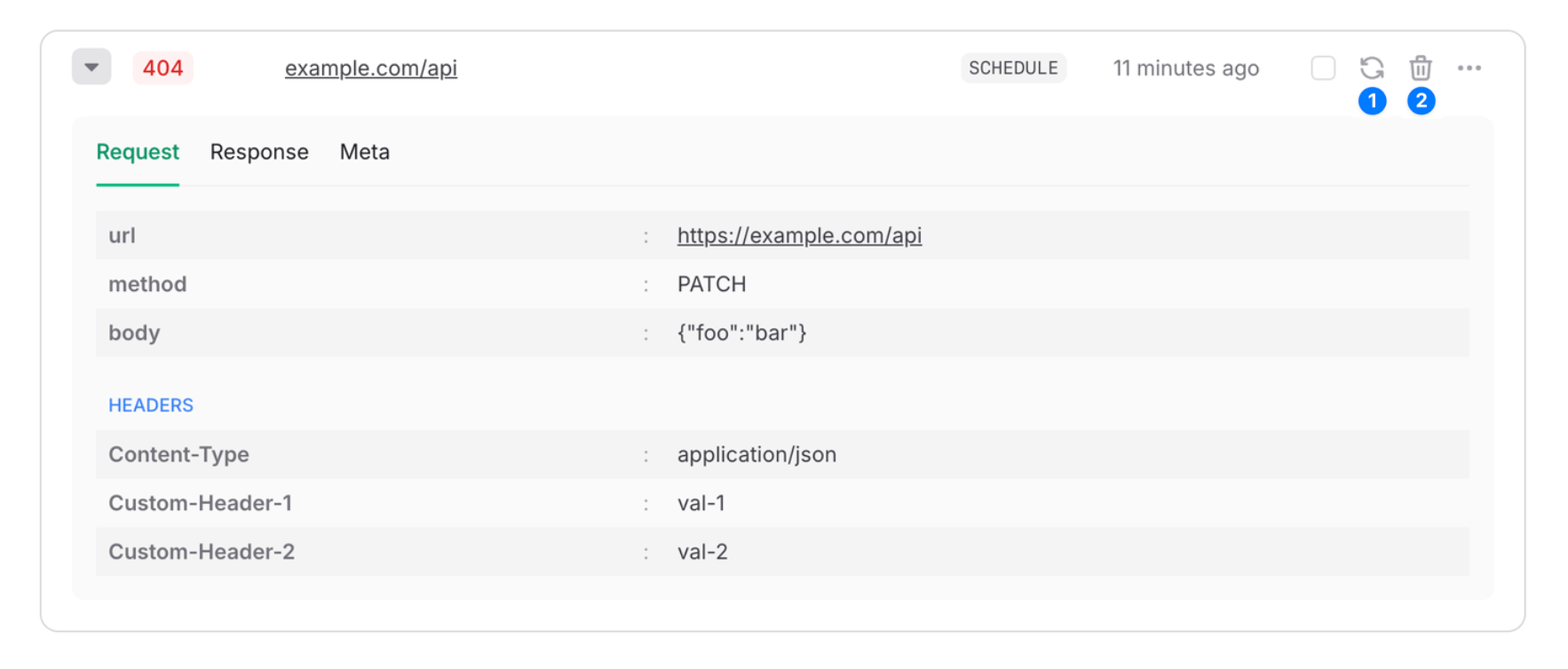 1. **Retry** - Republish the message and remove it from the dead letter queue. Republished messages are just like any other message and will be retried automatically if they fail.
2. **Delete** - Delete the message from the dead letter queue.
## Limitations
Dead letter queues are subject only to a retention period that depends on your plan. Messages are deleted when their retention period expires. See the “Max DLQ Retention” row on the [QStash Pricing](https://upstash.com/pricing/qstash) page.
## Related topics
- [Handling Failures](/qstash/howto/handling-failures.md)
- [Redis Queue: From FIFO Lists to a Job Queue](/redis/tutorials/redis_queue.md)
- [client.dlq.delete](/workflow/basics/client/dlq/delete.md)
- [API Examples](/qstash/overall/apiexamples.md)
- [Handle Failed Runs](/workflow/howto/failures.md)
1. **Retry** - Republish the message and remove it from the dead letter queue. Republished messages are just like any other message and will be retried automatically if they fail.
2. **Delete** - Delete the message from the dead letter queue.
## Limitations
Dead letter queues are subject only to a retention period that depends on your plan. Messages are deleted when their retention period expires. See the “Max DLQ Retention” row on the [QStash Pricing](https://upstash.com/pricing/qstash) page.
## Related topics
- [Handling Failures](/qstash/howto/handling-failures.md)
- [Redis Queue: From FIFO Lists to a Job Queue](/redis/tutorials/redis_queue.md)
- [client.dlq.delete](/workflow/basics/client/dlq/delete.md)
- [API Examples](/qstash/overall/apiexamples.md)
- [Handle Failed Runs](/workflow/howto/failures.md)